
GUIDE
Exposure value on input files
4 min read
How to capture images with the right EV for the best result.
Correct exposure value (EV) on the input files is essential for achieving clean, natural-looking results in post-production. We manually merge the different exposures and use the parts from your exposures that results in the best final image according to your choice of style.
Well-exposed input files are the foundation for natural, high-quality final images. Images that are too dark or too bright limit what can be done in editing and often lead to unnatural contrast, noise, or color shifts.
What “right exposure” means
The correct EV is about delivering files with:
- Preserved highlight detail
- Clean midtones
- Controlled shadows
- Natural color information
- Balanced exposures from bright to dark parts, depending on the actual conditions of the room
The EV values
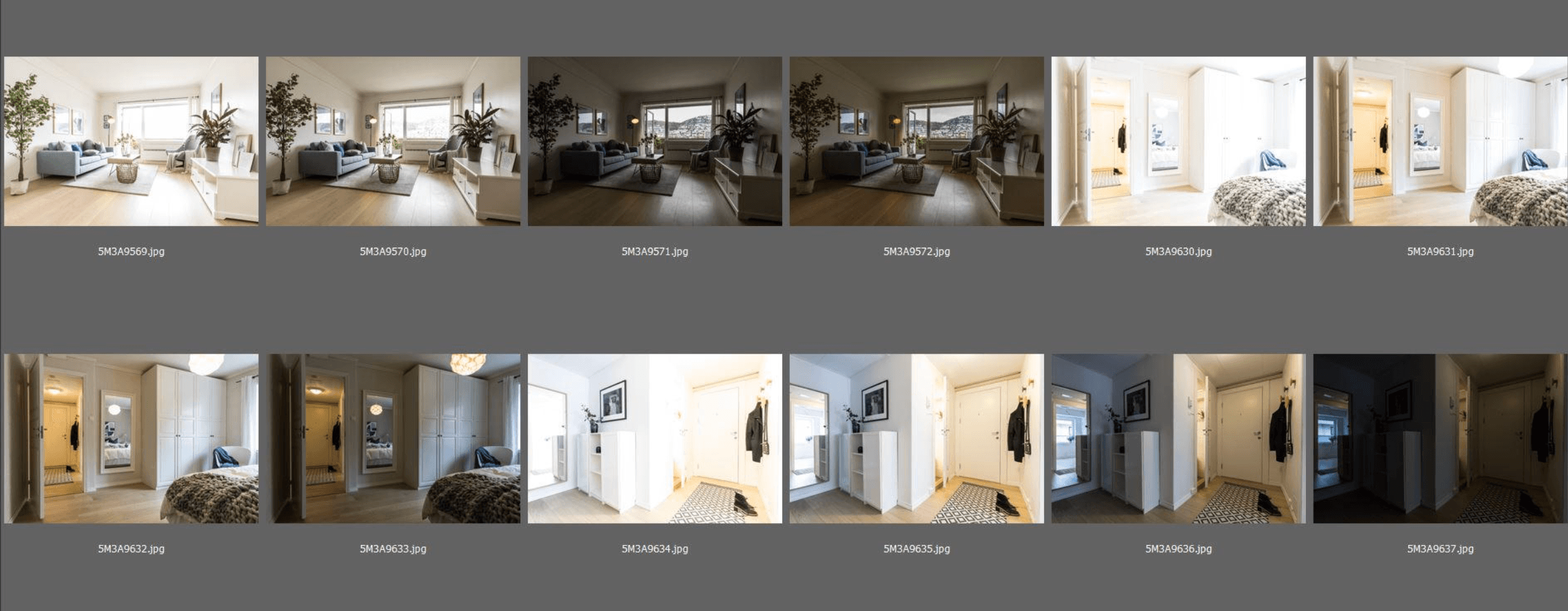
Use multiple exposures when needed - especially when there are windows in the image.
Ideal EV interval is 1 or 2 EV stops (depending on your camera and lens)
If you have three bracketed exposures the exposures will be -2EV, 0EV, +2EV with a 2EV interval.
Check your cameras manual for the best result.
Use your histogram as a reference
The histogram is a more reliable tool than the camera preview.
Have most data concentrated toward the mid-range, has a look of a centerd mountain.
Look for no heavy clipping on either end. Avoid histograms pushed heavily to the left (underexposed) or right (overexposed).
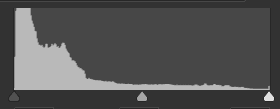
Dark exposure
Input for bright part recovery, window views and reflections in hard sunshine
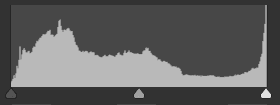
Midtone exposure
Good for main exposure
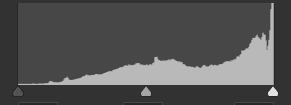
Bright exposure
Input for dark part recovery, when the room has great depth and the light is uneven
Prioritize midtones, not extremes
When setting the main exposure, always prioritize parts with good midtones in the image such as correctly exposed walls, floors, furniture.
Expose so that midtones look natural and well-lit. Then take as many exposures as needed to cover the brighter and darker parts of the image.
Avoid underexposure
Underexposed files are one of the most common causes of quality loss. Problems caused by underexposure:
- Increased noise when shadows are lifted
- Loss of color accuracy
- Flat or muddy-looking interiors
- 1-3 underexposed supporting images is often needed since they are ideal for view enhancements and other burned out details
Control the highlights
Having exposures with highlight detail is important
Blown highlights in windows or light sources are acceptable if you also send us exposures where the burned out parts are darker.
Adding too much highlight recovery in postproduction, on burned out highlights gives a flat and muddy look. Having an exposure to use instead gives better contrast and color on these parts.